
Introduction
Film visual effects are an essential part of modern filmmaking, allowing creators to show environments, characters, events and worlds that may be impossible, dangerous or impractical to capture entirely with a camera. From digitally created creatures and environments to invisible effects that simply remove unwanted elements, VFX can support almost every type of film.
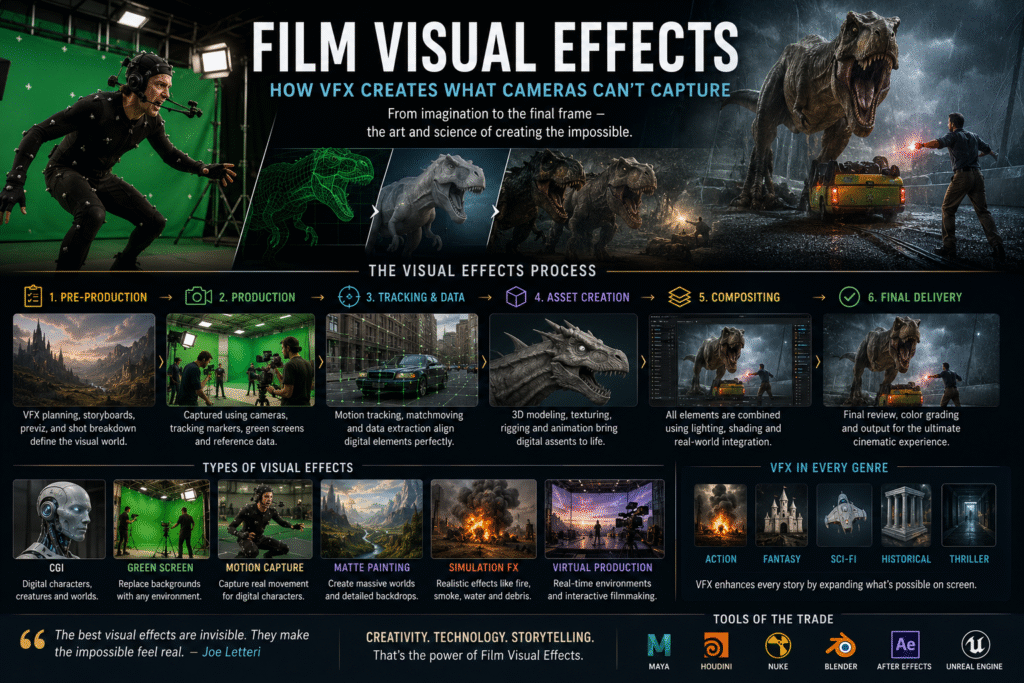
Modern film visual effects combine creative artistry with technologies such as CGI, compositing, motion tracking, green-screen production, 3D animation, simulations and virtual production. The process often begins during pre-production and continues through production and post-production until the final shots are approved.
The best visual effects are not necessarily the most noticeable. In many films, successful VFX works seamlessly with cinematography, production design, editing, colour and sound so that audiences remain immersed in the story.
What Are Film Visual Effects?
Film visual effects are digitally created or modified visual elements used to enhance, alter or create images that cannot be captured practically or efficiently during normal filming.
Visual effects can be used to create:
- Digital characters
- Creatures
- Buildings
- Landscapes
- Weather
- Explosions
- Vehicles
- Fantasy environments
- Historical locations
- Futuristic worlds
- Invisible corrections
VFX can also be used for relatively simple tasks, such as removing wires, replacing backgrounds or cleaning unwanted objects from a shot.
Why Are Film Visual Effects Important?
Visual effects give filmmakers greater creative freedom.
They can help filmmakers:
- Create impossible environments
- Expand physical sets
- Enhance practical effects
- Recreate historical locations
- Develop fictional worlds
- Create large-scale action
- Modify performances
- Remove unwanted elements
- Improve visual continuity
VFX can also reduce the need to physically build every environment or element required by a story.
However, visual effects should serve the story rather than exist simply to demonstrate technology.
What Does a VFX Artist Do?
A VFX artist creates, modifies or integrates visual elements into filmed footage.
The VFX industry includes many specialised roles, such as:
- VFX supervisor
- Compositor
- 3D artist
- Modeler
- Texture artist
- Animator
- Lighting artist
- Rotoscopy artist
- Matchmove artist
- FX artist
- Matte painter
- Technical director
Large productions can involve hundreds or even thousands of specialists working on different parts of the same project.
The Film Visual Effects Process
The film visual effects process usually begins before filming and continues through post-production.
Planning VFX During Pre-Production
VFX planning begins by identifying which parts of the script require visual effects.
The production team may determine:
- Which shots require CGI
- Whether green screens are needed
- Which environments need digital extensions
- Where practical effects will be used
- How cameras should capture VFX footage
- What tracking information is required
Early planning helps prevent expensive problems during post-production.
Capturing VFX Footage During Production
During filming, the production team captures the material required for later VFX work.
This may involve:
- Green screens
- Tracking markers
- Reference photography
- HDRI images
- Clean plates
- Camera data
- Lighting references
The VFX team may also work closely with the cinematographer to ensure that the footage provides enough information for later integration.
Organising and Tracking Footage
After production, VFX teams organise the footage and identify the shots that require visual effects.
The shots are then tracked through the production pipeline.
Large projects may use specialised systems to monitor:
- Shot status
- Artist assignments
- Versions
- Reviews
- Approvals
- Final deliveries
Efficient organisation becomes increasingly important as the number of VFX shots grows.
Creating Digital Assets
When a scene requires digital objects or characters, artists first create the necessary assets.
These can include:
- 3D characters
- Vehicles
- Buildings
- Props
- Landscapes
- Digital environments
The assets may then be textured, rigged and prepared for animation.
CGI and 3D Animation
Computer-generated imagery (CGI) allows filmmakers to create objects, environments and characters digitally.
CGI can be used for:
- Creatures
- Vehicles
- Buildings
- Landscapes
- Destruction
- Fantasy environments
- Digital characters
Animation gives movement to digital characters and objects.
The final result must be carefully integrated with the live-action footage so that the digital elements appear to belong in the scene.
Green Screen and Chroma Key
Green-screen technology allows filmmakers to replace a specific background colour with another image or environment.
The basic process involves:
- Filming the subject in front of a controlled background.
- Isolating the background colour.
- Removing that colour digitally.
- Placing the subject over a new background.
- Adjusting the composite so the elements appear integrated.
Green screens are widely used for environments that would be difficult or expensive to film practically.
Motion Tracking
Motion tracking allows VFX artists to analyse how a camera or object moves within a shot.
Tracking information can be used to attach digital elements to moving footage.
For example, a digital object can be positioned within a scene so that it moves naturally with the camera.
Accurate tracking is essential for convincing VFX integration.
Rotoscoping
Rotoscoping involves isolating specific subjects or objects from footage.
Artists may create detailed masks around:
- People
- Vehicles
- Props
- Buildings
- Moving objects
Rotoscoping is commonly used when a green screen is unavailable or when a particular subject needs to be separated from the background.
Compositing
Compositing is the process of combining multiple visual elements into a single finished image.
A composite may combine:
- Live-action footage
- CGI
- Background plates
- Digital environments
- Atmospheric effects
- Lighting effects
- Colour adjustments
The compositor’s job is to make these different elements appear as though they were captured together.
Digital Environments
Digital environments allow filmmakers to expand or completely replace physical locations.
A production may film actors on a limited set and then extend the environment digitally.
This can create:
- Large cities
- Fantasy landscapes
- Space environments
- Historical locations
- Futuristic worlds
Digital environments can provide filmmakers with creative possibilities that would otherwise be difficult to achieve practically.
Types of Film Visual Effects
CGI
CGI uses computer-generated imagery to create digital objects, characters and environments.
Practical Effects
Practical effects are physical effects created during filming.
Examples include:
- Miniatures
- Mechanical effects
- Prosthetics
- Physical explosions
- Special makeup
Practical effects can also be combined with digital VFX.
Digital Compositing
Compositing combines multiple visual elements into one final shot.
Matte Painting
Matte painting creates detailed backgrounds or environments that may not exist physically.
Motion Capture
Motion capture records movement from performers and can be used to drive digital characters.
Simulation Effects
Computer simulations can recreate:
- Fire
- Smoke
- Water
- Dust
- Destruction
- Particles
Virtual Production
Virtual production combines physical filmmaking with real-time digital environments.
It can allow filmmakers to photograph actors against digitally generated environments while seeing the visual world during production.
How CGI Is Used in Movies
CGI is used across many genres and production scales.
It can create something completely fictional or simply enhance something that already exists.
For example, filmmakers may use CGI to:
- Extend a building
- Remove modern objects from a historical scene
- Add crowds
- Create creatures
- Enhance explosions
- Build environments
- Replace backgrounds
The goal is often to make CGI blend naturally with practical footage.
How Green Screen Technology Works
Green-screen production depends on creating a clear separation between the subject and the background.
Good green-screen results require attention to:
- Lighting
- Subject positioning
- Shadows
- Spill
- Camera exposure
- Focus
- Costume colour
- Background consistency
Poorly captured green-screen footage can make the compositing process considerably more difficult.
What Is Motion Tracking in VFX?
Motion tracking analyses movement within footage so that digital elements can follow the same movement.
Tracking can be used for:
- Adding CGI objects
- Replacing signs
- Attaching graphics
- Stabilising footage
- Creating digital environments
Accurate tracking helps digital elements remain visually connected to the original camera movement.
What Is Rotoscoping?
Rotoscoping is the process of manually or digitally creating masks around objects or subjects in footage.
It is commonly used when VFX artists need precise separation between foreground and background elements.
Rotoscoping can be time-consuming because the masks may need to be adjusted frame by frame when subjects move.
What Is Compositing in Film?
Compositing brings separate visual elements together into one image.
A compositor may combine:
Live Action + CGI + Background + Lighting Effects + Atmospheric Effects
The final objective is to make these components appear as one coherent shot.
Good compositing depends on matching:
- Perspective
- Lighting
- Colour
- Shadows
- Focus
- Grain
- Motion blur
Film Visual Effects and Cinematography
VFX and cinematography must work together from the beginning of a production.
The cinematographer determines how the scene is photographed, while VFX artists later use that footage as the foundation for digital work.
Important information can include:
- Camera position
- Lens
- Exposure
- Lighting
- Camera movement
- Depth of field
Good communication between the cinematography and VFX teams helps create more convincing results.
Film Visual Effects and Film Editing
The edit determines which shots ultimately require visual effects and how long those shots appear on screen.
Editors may initially work with:
- Temporary VFX
- Placeholders
- Previsualisation
- Rough composites
Once the edit is approved, VFX teams can work toward final versions.
This is why changes after picture lock can sometimes create additional VFX work.
Film Visual Effects and Colour Grading
Colour grading is usually performed after the final VFX shots have been integrated.
The colourist ensures that live-action and digital elements share a consistent visual appearance.
This can involve matching:
- Contrast
- Colour
- Exposure
- Skin tones
- Highlights
- Shadows
A successful VFX shot should look like part of the same film rather than a separate digital element.
Film Visual Effects and Sound Design
Visual effects and sound design often work together to create impact.
A large digital explosion may require:
- Low-frequency impact
- Debris sounds
- Environmental reactions
- Character reactions
- Music
The image provides the visual event while sound gives it weight and emotional intensity.
AI and the Future of Film Visual Effects
Artificial intelligence is increasingly being explored within VFX workflows.
Potential applications include:
- Rotoscoping assistance
- Object removal
- Image generation
- Background creation
- Tracking assistance
- Image enhancement
- Concept development
AI may reduce the time required for certain repetitive tasks, but professional VFX still requires artistic judgement, supervision and quality control.
The future is likely to involve a combination of traditional VFX techniques, AI-assisted tools and human creativity.
Film Visual Effects for Independent Filmmakers
Independent filmmakers can use VFX strategically even when working with limited budgets.
Instead of attempting to create large-scale effects everywhere, filmmakers can focus on specific shots where visual effects provide the greatest storytelling value.
Practical approaches include:
- Digital set extensions
- Object removal
- Background replacement
- Simple compositing
- Motion graphics
- Environmental enhancement
Careful planning can significantly reduce unnecessary VFX costs.
Common VFX Challenges
Poor Planning
VFX problems can become expensive when requirements are not identified before filming.
Inconsistent Lighting
Digital elements must match the lighting of the original footage.
Incorrect Perspective
A CGI element can look unrealistic if its perspective does not match the camera.
Poor Tracking
Incorrect tracking can cause digital elements to move unnaturally.
Weak Compositing
Poor integration can make CGI immediately noticeable.
Excessive VFX
Using visual effects simply because they are available can distract from the story.
How Much Do Film Visual Effects Cost?
There is no single fixed cost for film visual effects.
The budget can depend on:
- Number of VFX shots
- Complexity of the effects
- CGI requirements
- Number of characters
- Digital environments
- Simulation work
- Production schedule
- Number of revisions
- Size of the VFX team
A few simple visual corrections can require relatively limited resources, while feature-film CGI sequences can involve large teams and substantial budgets.
How Long Does VFX Production Take?
The timeline depends heavily on the complexity of the project.
A simple cleanup shot may take significantly less time than:
- A digital creature
- A large environment
- A destruction sequence
- A complex action shot
VFX can continue for months on larger productions, particularly when there are extensive revisions and hundreds or thousands of shots.
The Future of Visual Effects in Cinema
The visual-effects industry continues to evolve as new technologies become available.
Future workflows are likely to combine:
- CGI
- Virtual production
- Real-time rendering
- AI-assisted tools
- Motion capture
- Traditional compositing
- Practical effects
The important principle will remain the same: technology should help filmmakers tell better stories.
Final Thoughts
Film visual effects have transformed what filmmakers can create on screen.
From subtle background corrections to enormous digital environments, VFX allows filmmakers to extend the possibilities of physical production.
The process requires collaboration between directors, cinematographers, editors, VFX supervisors, artists, colourists and sound professionals. Each department contributes to making the final image believable and consistent.
As AI, virtual production and real-time technologies continue to develop, visual effects will become even more integrated into the filmmaking pipeline.
However, technology is only part of the process. Strong storytelling, thoughtful planning and creative judgement remain the foundation of effective visual effects.